What Is a Campaign Strategy Workspace? The Complete Guide
Search for "campaign strategy workspace" right now and you won't find a clear answer. You'll find project management tools that handle campaign workflows and approvals. You'll find AI copy generators that write ad variants. You'll find competitive intelligence platforms that track what rivals are doing. What you won't find is one clear definition of what a campaign strategy workspace is, because as a category, it's still being defined in real time.
This guide sets out that definition, explains what separates it from adjacent tools, and lays out what to look for if you're evaluating one for your team.
What Is a Campaign Strategy Workspace?
A campaign strategy workspace is a single platform that takes a marketing team from raw market intelligence through to a launch-ready ad campaign, and then keeps working after launch by tracking performance and feeding those learnings into the next campaign. It combines competitor and audience research, strategic recommendation, creative generation, and post-launch optimization into one connected workflow, rather than treating each as a separate tool with its own login and its own disconnected output.
While there are independent tools that could cater to the intelligence, strategy, creative, and analytics part of the value chain, what differentiates a campaign strategy workspace from the rest is its ability to offer the entire workflow, without losing context, knowledge or legacy data. For example, intelligence shapes the strategy, creatives are based on the selected strategic direction, and so on. Nothing in the value chain starts from a blank page, and nothing in the chain ends when the ads go live.
Think of it like a road trip with a GPS that actually learns. A basic map app plots your route once: here's the fastest way from A to B. A campaign strategy workspace behaves more like a GPS that also watches how the trip actually goes: it notices where you hit traffic, remembers which route was faster last time, and reroutes you automatically the next time you make a similar trip.
Why This Isn't the Same as a Point Solution or a General AI Assistant
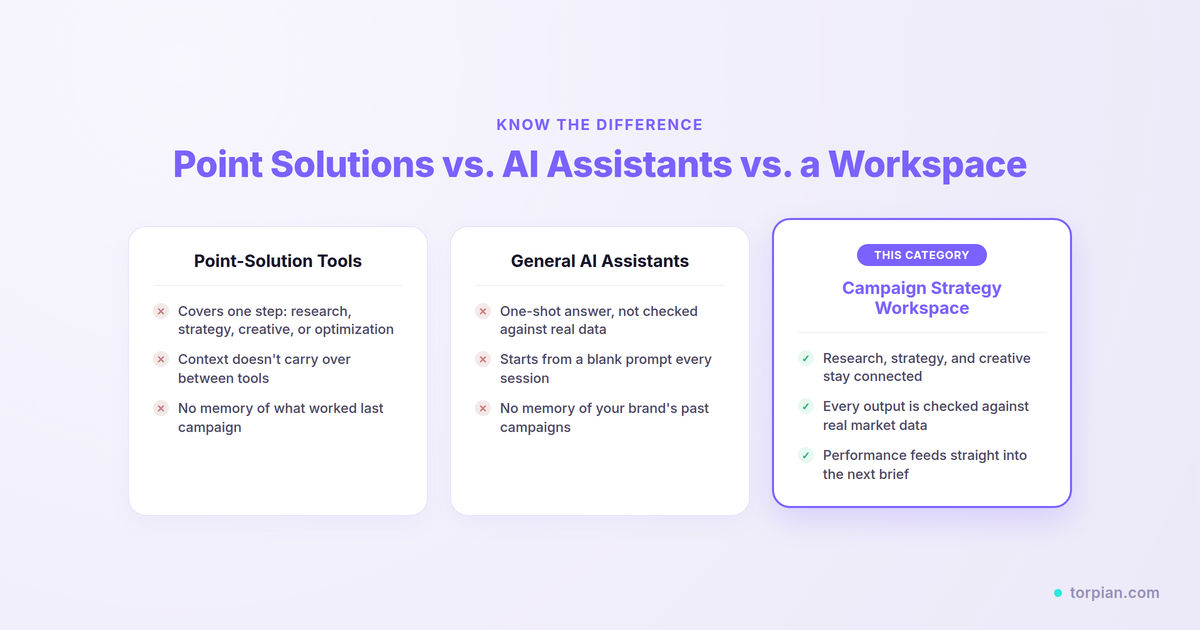
Most of what currently gets marketed as an "AI marketing tool" is a point solution: it does one piece of the chain well and stops there. An intelligence tool will surface market insights, but it won't turn that into a campaign. An AI creative tool will generate ad copy or images from a prompt, but it has no idea what your competitors are doing or what worked last quarter. A strategy-only tool might hand you a positioning document, but someone still must turn that into actual creative and launch it. Each of these does a job. None of them does the whole job, so a team ends up stitching two or three subscriptions together and manually carrying context between them.
Then there's the option a lot of marketers default to: opening ChatGPT or Claude and asking it to build a campaign strategy directly. It's fast and it's free, and that's the problem, because what comes back is the product of a single pass of reasoning. The model isn't checking its own strategy against what your competitors are doing right now; it's generating a plausible-sounding answer from what it already knows. Nothing in that process compares the output against real market data, and nothing flags it if a recommendation doesn't hold up once you look closer. It also has no persistent memory of your brand's past campaigns, no live connection to your competitive landscape or ad accounts, and no mechanism for feedin thg real performance data back intoe next request. Every session starts from a blank prompt. The output is fast and free, but it's also shallow and unverified, and you're the one left doing the strategic thinking and the fact-checking. The assistant is just helping you write it up faster.
The Core Components of a Campaign Strategy Workspace
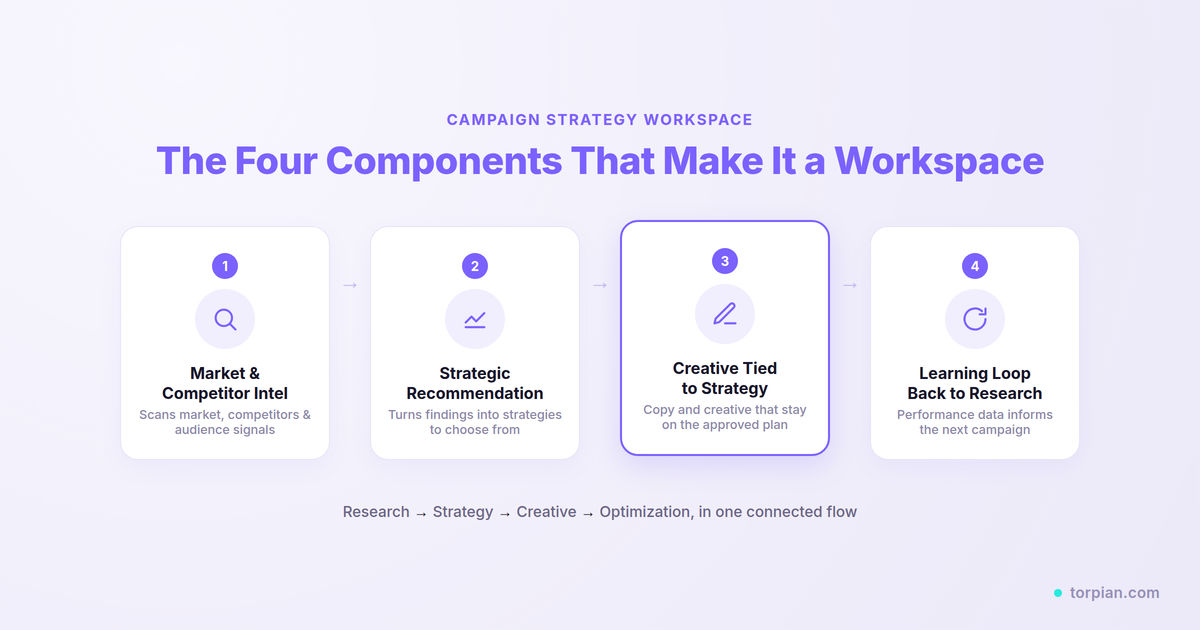
A tool earns the "campaign strategy workspace" label when it covers these four functions in one connected flow, not as separate add-ons.
Market intelligence
This is the research layer: scanning competitor moves, audience behavior, and search demand before a single word of creative gets written. Torpian, for example, runs this as its Intelligence Agent, continuously monitoring market shifts across five demand pillars and surfacing what's relevant rather than dumping raw data on the user.
Strategic recommendation
This stage turns findings into a small set of concrete strategic options, positioning angles, messaging directions, channel and budget recommendations that a human can review and pick from. This is the step most tools skip entirely, jumping straight from research to content.
Creative generation tied to strategy
Once a strategy is approved, the creative stage should generate copy and creative that stays consistent with it, not creative that starts from scratch with no memory of what was just decided. This is what separates a workspace from a standalone AI writing tool.
A learning loop back into the next campaign
The best campaign strategy workspaces don't treat each campaign as an isolated event. Performance data from a live campaign should feed back into the intelligence layer, so the next campaign starts smarter than the last one did. Without this loop, a tool is really just three disconnected features bundled under one login.
The single trait that separates a campaign strategy workspace from a bundle of marketing tools is context retention. If insight from research doesn't visibly shape the strategy, and approved strategy doesn't visibly shape the creative, it's not a workspace. It's a set of tabs.
Why Campaign Strategy Workspaces Are Emerging Now?
Two things are actually driving this.
Marketing has always split research, strategy, creative, and performance tracking across separate people or separate tools, and every handoff between them loses time and loses context. This isn't a guess about how marketing teams work. In a 2025 survey of 272 marketing professionals by Acoustic and eMarketer, 54% named disconnected platforms as one of the biggest blocks stopping their team from getting value out of its own data, and when asked what would help most, marketers' top answer was simply better integration between the tools they already have.
Teams have run marketing this way for decades. Think of it like a wagon built the old way, before factories: the blacksmith's shop forged the axle, the wheelwright's shop down the street built the wheels, and the paint shop finished it, and the half-built wagon had to be carted between all three, waiting each time for the next shop to have room. Nothing about the wagon changed when someone finally put all three stations under one roof. What changed was that the handoffs disappeared. A campaign strategy workspace is that same move applied to marketing stations, research, strategy, creative, and optimization, under one roof instead of four separate shops with a cart running between them.
The second, and more immediate, driver is the pace marketing teams are being asked to keep up with. Every time a new channel, format, or platform shift lands, teams are expected to adapt to it fast, and campaign cycles keep compressing as a result. At the same time, most teams are being told to do this while staying operationally lean. Those two pressures together, adapting constantly and staying lean, are what makes the old shop-to-shop handoff model untenable. A team that's stretched thin can't afford to lose two days to a research doc sitting unread in someone's inbox.
What made the fix possible now, rather than five years ago, is that the connecting technology, AI systems that can carry context across steps instead of resetting after each one, finally caught up to a problem marketing has had all along.
Five Questions to Ask Before You Buy One
If you're comparing tools that claim to be a campaign strategy workspace, these are the questions worth asking before you commit budget:
Does the strategy actually build on the research, or does it start fresh?
Pick one specific competitor insight or search trend from the research. Then ask the tool to show you where that exact insight shows up in the strategy it recommends. If you can't point to it, the two aren't really connected.
Does creative reflect the approved strategy, or is it generic output from a prompt?
Generate a few variants and check whether they reference the specific positioning angle chosen, not just the product category.
Is there a human approval step at each stage, or does it auto-publish?
A workspace that skips your sign-off between research, strategy, and launch is a risk, not a convenience.
What happens to performance data after a campaign goes live?
If there's no mechanism for that data to inform the next campaign, the "learning loop" is marketing language, not a real feature.
Can you try it before committing to an annual contract?
Tools confident in this workflow tend to offer a self-serve trial. Tools that require a sales conversation before you see anything are worth extra scrutiny.
How Torpian Implements This
Torpian is built specifically around this definition, not as a side feature but as the core workflow. You start by describing your brand and goal.
The Intelligence Agent scans competitors, audience signals, and market shifts using a triangulation methodology that cross-validates multiple sources rather than relying on one.
The Strategy Agent turns that into a small number of concrete strategic options, positioning, messaging, channel and budget guidance, for you to choose from.
Once you approve a direction, the Creative Agent generates ad copy and creative for Google, Meta, YouTube, and LinkedIn that stays consistent with the chosen strategy, packaged as launch-ready files for each platform's ad manager.
The whole flow lives in one workspace with a human-in-the-loop approach, so nothing launches without a human decision.
Command Center: Closing the Loop After Launch
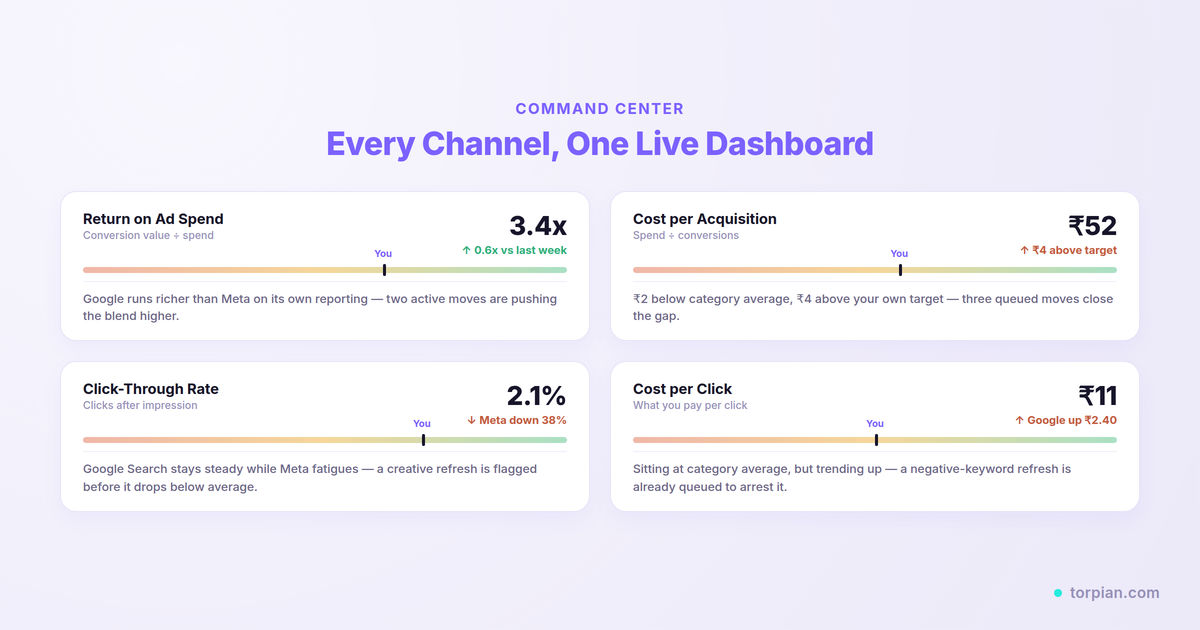
This is where a lot of tools stop, and where a campaign strategy workspace is supposed to keep going. Once a campaign is live, Torpian's Command Center tracks performance across every connected ad account, surfaces which creatives are actually winning, and flags specific optimization opportunities, like a message angle underperforming or a channel outpacing the rest, for you to act on. That performance data doesn't just sit in a dashboard. It feeds straight back into the Intelligence Agent, so the next campaign brief starts with real evidence of what worked, not a guess.
It's the same idea as a sports team that reviews game footage. Playing the game is one skill. Watching the recording afterward to see which plays worked, and adjusting the playbook before the next game, is a different skill, and it's the one that compounds over a season.
Frequently Asked Questions
What is a campaign strategy workspace? A campaign strategy workspace is a tool that combines market and competitor research, strategic recommendation, and creative generation into one connected workflow, where each stage builds on the last rather than operating as separate, disconnected tools.
How is a campaign strategy workspace different from a marketing platform? "Marketing platform" is a broad, generic term that can describe anything from an email tool to a full suite. A campaign strategy workspace is specifically about the pre-launch to launch chain: research, strategy, and creative in one flow, with a learning loop back into future campaigns.
Do I need a campaign strategy workspace if I already use a competitive intelligence or AI creative tool? Those point solutions each cover one piece of the chain, research or creative, but not both, and they don't carry context between them. Most teams using one of these still need a separate process for the pieces it doesn't cover. A campaign strategy workspace replaces that patchwork with one connected flow instead of adding another disconnected tool to it.
Does a campaign strategy workspace track performance after a campaign launch? It should. A tool that only helps you plan and launch a campaign is doing half the job. The defining trait of the category is a closed loop: performance data from a live campaign gets tracked and fed back into the research and strategy stages, so the next campaign starts with evidence instead of guesswork. Torpian does this through its Command Center, which surfaces winning creatives and optimization opportunities and carries them into the next campaign brief.
The Bottom Line: It's About Connection, Not Features
A campaign strategy workspace is defined by connection, not by any single feature. It carries market intelligence into strategy, strategy into creative, and campaign performance back into the next round of intelligence, all inside one tool with human approval at each step. Point-solution tools handle one piece of the chain. General AI assistants generate a single pass of unverified output. Neither does the full chain, which is exactly the gap this category exists to close.
If you're evaluating tools in this space, use the five questions above rather than the marketing copy on a landing page. The real test of whether something is a campaign strategy workspace or just a bundle of features is whether you can see the thread connecting research to strategy to creative, clearly, every time.
Ready to see this workflow with your own brand? Start your free trial and build your first campaign strategy in one workspace, or request a demo to walk through it live.